⚡ Try It: Transcribe & Action Workshop Notes
Step 1: Get your image. In Gemini, you can upload this image directly, or take a photo of your own notes.
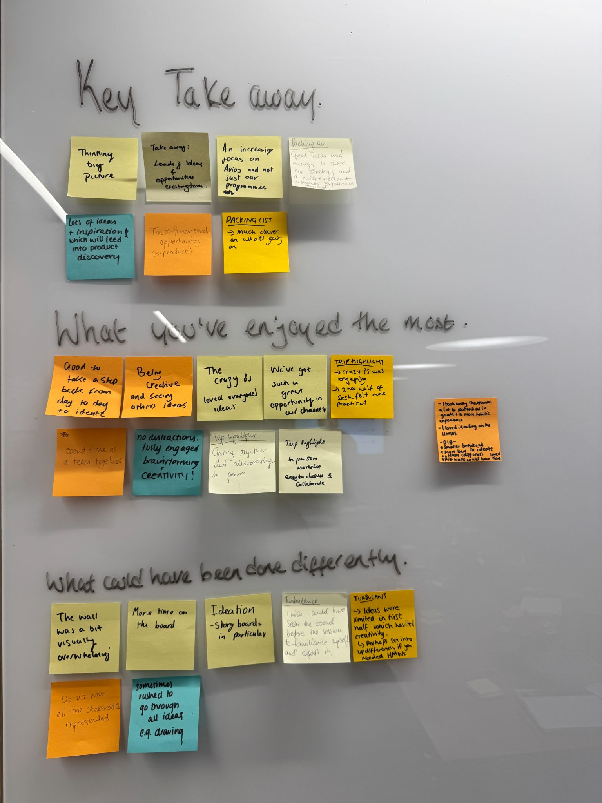
Step 2: Copy the prompt below. This prompt asks Gemini to act as a facilitator, not just transcribing but also creating summaries, actions, and follow-up emails.
PERSONA:
You are an expert workshop facilitator and project manager. Your strength is turning messy, visual workshop notes into clear, structured, and actionable summaries.

CONTEXT:
I have uploaded an image of our notes from a recent retrospective workshop. The image contains handwritten sticky notes, likely grouped into categories

TASK:
1.  Transcribe all the handwritten text from the sticky notes in the image.
2.  Organise this transcription into the logical categories you identify from the board (e.g., "What Went Well," "What Could Be Improved," "Action Items").
3.  Write a concise summary of the key themes for each category.
4.  From the "Action Items" category, extract a clear, numbered list of follow-up tasks.
5.  For each task, suggest a likely owner or team (e.g., "Product Owner," "Design Team," "Tech Lead").
6.  Draft a short, professional follow-up email for each of the identified owners, clearly stating their action item, its context, and the expected next step.

OUTPUT:
A well-structured report:
1.  **Full Transcription:** (Grouped by category)
2.  **Key Themes Summary:** (Bulleted list per category)
3.  **Actionable Follow-Ups:** (Numbered list with suggested owners)
4.  **Draft Emails:** (A separate email for each action owner)
Step 3: 🚀 Open Gemini & upload the image, and paste the prompt into the chat.
Key Takeaway: Gemini's multimodal capability (understanding images) can save you hours of admin. Instead of just getting a transcription, you can get a complete, actionable plan, including draft communications, all from a single photo.